Results for "bloging"
10 SEO Tips for Small Businesses

SaveDelete : This is a guest post my Mohan Madan, who is SEO analyst in a small town near Jaipur, India. Small businesses should follow the following 10 tips provided by an SEO agency when it comes to effectively utilizing SEO tactics to help their business expand.

1) Keywords and keyword phrases are a must when it comes to staying ahead of competition. Businesses find that they can no longer receive high rankings by utilizing one keyword. Googleadwords is a wonderful site when it comes to discovering what consumers are searching for. It is also smart for small businesses to utilize software that helps them see which key phrases are being searched for that relate to their business industry.

2) Interesting content found on web pages is also a must. Simply looking at products and reading ‘fluff’ does not cut any more these days when it comes to pleasing consumers. All content should be informational and interesting.

3) All small business websites should have a mobile-friendly website that can be used by mobile users.

4) Google Places has transformed the way consumers search for products and services. Staying up to date on the way consumers search is critical in any business’ success.

5) All small businesses should use some type(s) of effective link building strategy. Thesestrategies help business websites achieve high ranking on search engine results, and it is important for all link building strategies to include both internal and external linking.

6) Businesses should also use a canonical pathway domain; this helps them to create a method at avoiding unneeded repeated page variations that can sometimes be found within search engines.

7) Checking a cache log of page viewings enables a business to see which of their website pages are being crawled. The less a page is being crawled the less likely it is that it is being viewed at its top potential.
 
Always placing photos on websites is a must, even if the website contains mostly texts about services the business is offering, the photos come with texts boxes. The text found within the boxes can help the website to obtain higher search engine rankings.

9) It is important to make sure the load speed of a website it up to par. If it is not then consumers usually move on to another website that loads faster.

10) Always make sure no links are broken within a business website, search engine spiders hate this.

This entry was posted in Internet Tips and tagged SEO. Bookmark the permalink.
 

Unknown 5/28/2011
WordPress 3.1.3 and 3.2 Beta 2 Released
H-Online : The WordPress.org development team has released version 3.1.3 of its open source blogging and publishing platform; this is a maintenance and security update to WordPress 3.1 released in late February. According to the developers, the stable update features security hardening and taxonomy query hardening, and prevents the sniffing out of user names of non-authors by using canonical redirects.

WordPress 3.1.3 also introduces clickjacking protection in modern browsers on admin and login pages. In the event of an import not completing, the old import files will be cleaned up automatically. Other changes include media security fixes and improved file upload security.

At the same time, the developers also published a second beta of version 3.2 of WordPress. The latest beta adds support for Google's Chrome Frame in the admin area. The developers say that the admin area is now "less ugly" in Internet Explorer 7 (support for IE6 was dropped in the previous beta) and that the blue admin colour scheme is now ready for testing. jQuery 1.6.1 is now being bundled and users are advised to test any JavaScript that uses jQuery. Release candidate versions are planned for June, followed by a final version "by the end of the month".

As previously noted by the developers, version 3.2 of WordPress has new system requirements: PHP 5.24 and MySQL 5.0. As with all development releases, use on production sites is not advised. Users testing the release are asked to provide feedback and report any bugs that they find in the forums, mailing lists, over IRC on irc.freenode.net #wordpress-dev or directly into the WordPress Trac.

More details about both the latest stable version and development versions can be found in the announcement news post; information specific to the stable version is in the 3.1.3 change log. WordPress 3.1.3 and 3.2 Beta 2 (direct download) are available to download from the project's web site. Alternatively, 3.1.x users can update automatically via the Dashboard > Updates menu in the site admin area. WordPress is licensed under the GNU General Public Licence (GPL).
 

Unknown 5/26/2011
WordPress 3.1.2 Release

Team Pengembang WordPress.org telah merilis versi 3.1.2 dari open source platform blogging dan penerbitan, dan pembaruan keamanan pemeliharaan untuk WordPress 3.1.

Menurut para pengembang, update terbaru beberapa bug di Wordpress, termasuk kerentanan keamanan yang bisa memiliki "tingkat pengguna Contributor diperbolehkan untuk mempublikasikan posting tidak semestinya". Semua pengguna didorong untuk meng-upgrade ke rilis terbaru sesegera mungkin.

Rincian lebih lanjut dapat ditemukan di posting blog WordPress dan di change log. WordPress 3.1.2 tersedia di dashboard Wordpress atau dapat didownload dari situs web proyek tersebut. Atau, pengguna dapat melakukan update secara otomatis melalui Dashboard > Updates di admin area. WordPress dirilis di bawah GNU General Public License (GPL).

Unknown 4/27/2011
Top 10 Online HTML Editors
Online - HTML - Editor : Cukup melakukan apa yang dikatakannya, editor HTML sederhana yang memproduksi konten HTML  online dengan cara sederhana dan gratis untuk digunakan.


WYSIWYG HTML Editor : Ingin lelang kelihatan lebih baik? Tidak bisa bekerja dengan editor eBay? Tidak ingin menggunakan halaman tools web authoring yang rumit untuk membuat kode yang tidak akan bekerja di eBay? Tidak merasa nyaman melakukan semua pengeditan Anda pada halaman daftar? Spice up lelang Anda dengan alat yang menciptakan-compliant kode eBay.


HTML Editor : Free Online WYSIWYG HTML Editor seperti  MS Word. benar-benar editor yang sangat berguna karena memungkinkan Anda untuk bekerja dalam 2 mode - preview dan source. Bekerja dengan penampilan Anda dalam preview mode dan editor secara otomatis akan menulis HTML dalam mode source.


HTML Instan : Sebuah editor HTML yang memiliki ekstensi Google chrome sendiri. editor ini memungkinkan Anda untuk memeriksa perubahan secara real time dan memiliki tombol tag HTML dasar.


Ajax.org Cloud9 Editor : Ace adalah editor kode mandiri ditulis dalam JavaScript. Hal ini dapat dengan mudah tertanam dalam setiap halaman web dan aplikasi JavaScript. Ace dikembangkan sebagai editor utama untuk IDE Cloud9 dan penerus dari Proyek Skywriter Mozilla (Bespin) .


Tiny MCE : Salah satu favorit online HTML editor untuk para pengembang dan desainer. Sebuah editor matang yang digunakan oleh jutaan orang di seluruh dunia.


Amy Editor : Sebuah online editor yang sangat sederhana yang mendukung HTML, Ruby, Python, Texy, PHP, dll!,


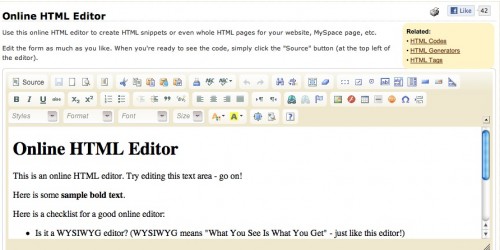
Online HTML Editor : Di sini Anda bisa menulis dan melihat HTML dalam tindakan.


Real-Time HTML Editor : mari kita lihat, mengedit situs web dapat menjadi nyata. Terus-menerus harus beralih di antara Anda website membuat perangkat lunak dan jendela browser anda memakan waktu yang berharga, mari kita hadapi itu, bisa berarti lebih lama melakukan hal yang lebih baik, seperti sebenarnya coding website Anda. Nah itu dimana real-time HTML Editor yang masuk The real-time HTML Editor memecahkan masalah menjengkelkan ini dengan memungkinkan Anda untuk melihat editan Anda segera. Persis seperti mereka yang muncul secara normal jendela browser .


Quackit Online HTML Editor : Gunakan online editor HTML ini untuk membuat potongan HTML atau bahkan seluruh halaman HTML untuk website Anda, MySpace page, dll. Edit formulir sebanyak yang Anda suka. Bila Anda siap untuk melihat kode tersebut, cukup klik tombol "source" (di bagian kiri atas editor).


Unknown 4/05/2011
"View" Fitur Terbaru Blogger, Mantab Gan.
Hari ini Google melihat pratinjau lima dinamika baru template di Blogger bahwa Anda akan segera dapat menyesuaikan dan menggunakan untuk blog Anda. Pandangan-pandangan baru gunakan dalam teknologi web terbaru, termasuk AJAX, HTML5 dan CSS3, untuk memberikan sejumlah manfaat bagi Anda dan pembaca Anda:

  • Infinite scrolling: membaca posting lebih tanpa harus reload atau klik ke halaman kedua 
  • New layoutds: pandangan yang berbeda cocok untuk berbagai jenis blog 
  • Speed: men-download gambar seperti yang Anda melihatnya, tidak semua sekaligus di muka 
  • Interactivity: sekarang ada cara lebih untuk mengalami dan terlibat dengan konten blog 


Klik pada salah satu link untuk mengambil pandangan dinamis baru untuk berputar pada beberapa blog favorit kami: Flipcard , Mosaic , Sidebar , Snapshot dan Timeslide .


Untuk mencoba pandangan ini pada blog Anda sendiri, cukup tambahkan "/view" ke akhir, misalnya blog URL-untuk http://takecy07.blogspot.com/view. Pandangan-pandangan baru yang tersedia pada semua blog publik Blogger dengan feed sepenuhnya memungkinkan-untuk mempelajari lebih lanjut, termasuk cara menonaktifkan pandangan untuk blog Anda jika Anda mau, silakan lihat artikel bantuan pusat

Google melihat pratinjau template ini sejak dini sehingga kita dapat menggabungkan tanggapan Anda untuk segera memulai yang lebih luas. Pada saat itu Anda akan dapat menyesuaikan template ini dan pilih salah satu untuk blog Anda. Harap beritahu kami apa yang Anda pikirkan! " Kata Google"


taken and editet from blogger offical blog

Unknown 3/31/2011
WordPress Blogs Land on the iPad
Selama tahun lalu, platform blogging WordPress telah hampir dua kali lipat meningkat dari 10,5 juta blog Maret lalu, menjadi 18 juta hari ini. Dengan lebih dari 10% dari Web powered by Wordpress - menurut pengembang  Matt Mullenweg - telah menjadi semakin penting bagi perusahaan untuk mendukung interface yang lebih dan hari ini telah melakukan hal itu dengan tema iPad dioptimalkan.

Perusahaan ini mengumumkan hari ini bahwa pandangan dioptimalkan iPad akan segera tersedia, membaawa rotasi, dan banyak fitur lainnya dari iPad" untuk semua 18 juta blog di WordPress.com.


Ketika Mullenweg berbicara pada tahun ini SXSW , ia menggambarkan Wordpress semakin menjadi platform. Wordpress tidak hanya  digunakan sebagai platform blogging, tetapi sebagai sistem manajemen konten. WordPress.com dan WordPress.org menangani lebih dari 520 juta pengunjung unik per bulan, kata Mullenweg. Sekarang, banyak dari mereka yang blog akan lebih dapat diakses oleh pengguna iPad.

Menurut pengumuman, blog versi iPad Wordpress.com akan didukung oleh HTML5 dan OnSwipe , membawa sebuah fungsionalitas "app-like"  untuk pengguna iPad. Sudah, sekitar 750.000 tampilan halaman setiap hari datang dari pengguna iPad dan perusahaan mengatakan bahwa "dengan peluncuran Apple iPad kita telah melihat masa depan komputasi dan itu adalah sentuhan."

Penambahan sebuah-pandangan iPad dioptimalkan akan memungkinkan pemilik blog untuk menyesuaikan gambar latar belakang, logo, font dan layar untuk pengunjung iPad, serta menonaktifkan atau mengaktifkan tampilan iPad seluruhnya. Bagi mereka yang menjalankan WordPress pada server mereka sendiri, pandangan iPad tersedia sebagai plug-in terpisah .

Watch video di bawah ini untuk sedikit lebih di mana Mullenweg melihat masa depan dari WordPress.


Unknown 3/24/2011
Free HTML5 WordPress themes
1. A free HTML5 and CSS3 Theme


2. Free Dream HTML5 WordPress Theme


[ Download Link ]

3. Free HTML5 Website Template Portfolio


[ Download Link ]

4. Free HTML5 WordPress Theme


[ Download Link ]

5. Gotta’ love HTML5 & CSS3


[ Download Link ]

6. Grey: A New Free HTML5/CSS3 WordPress Theme


[ Download Link ]

7. HTML5 Template


[ Download Link ]

8. One-Page Website Template


9. Orange Flower HTML5 WordPress Themes


10. Spectacular HTML5 Themes


11. An Accessible HTML5 WordPress Theme


Unknown 3/23/2011