Results for "opera"
Download Opera "Next" v11.50

Downloadcrew : The days when major browser updates were few and far between are over. Nowadays, it’s de rigeur for browser manufacturers to speed up development, which means opening up less stable builds to the masses in order to get them bug-checked as quickly as possible.

Opera is no exception, but it’s trying a clever approach to encourage as many people to act as beta testers without affecting their existing Opera installation. Opera Next is the latest developmental version of Opera, but made available as a separate browser that is installed alongside your existing stable version of Opera.

The reasoning is simple: you get to try out the new features without affecting your existing installation, so if the developmental version is too buggy for your tastes, you can switch over to your tried and trusted version, no problem. And because Opera Next updates as soon as the latest development build is released, you can keep checking back regularly to see what’s up and coming and whether the bugs you’ve encountered have been fixed yet.

You’ll be able to differentiate between stable and developmental build by the colour of the program icon: Opera’s icon remains red, while Opera Next’s icon will be silver grey, meaning it’ll be safe for even relatively inexperienced users to try out new features before they become generally available.

Aside from introducing Opera Next, version 11.50 introduces support for Speed Dial extensions. This will allow developers the chance to craft extensions for the Speed Dial page, allowing it to show more than simple site icons or static snapshot images of the site itself.

Although this build installs alongside Opera, we'd still recommend it's treated with the same caution you would any pre-release software. Less experienced users may wish to stick to the stable version only.

Build 1027 is now Opera 11.50 "Swordfish", which is an official beta. More changelog details here: http://www.opera.com/docs/changelogs/windows/1150b/
Verdict:

If you’re interested in checking out what’s coming in a future version of Opera, then Opera Next is well worth a look. Be warned, however, that this is an extremely early version, so not recommended for less experienced users.


Unknown 6/01/2011
Download Opera Mobile Emulator

Ghacks : Mobile devices, from smartphones to tablets, start to become popular for normal web related tasks like visiting websites, watching movies or playing games. This can be attributed to the advancement of hardware to make the devices faster and more responsive, software like Opera Mobile that make the most out of what little space and speed you have and Internet rates that do not bankrupt you if you happen to stay connected for a few hours.

The rise of mobile devices poses a new challenge for webmasters, who now have ensure that users who visit their sites from mobile devices have the best possible experience doing so.

Opera Mobile Emulator is one tool to aid webmasters in this task. The program emulates Opera Mobile running on various devices on a Windows desktop system.

You need to install Opera Mobile Emulator on Windows before it can be used. It opens up with a configuration screen that you can use to select a pre-configured profile or a custom profile for the emulator.

Available devices are Samsung Galaxy S, HTC Wilfdire, Motorola Droid X, LG Optimus One, Nokia N900 and about a dozen or so others. The resolution is automatically selected for those devices and all that is left for you to do is to click launch to start the emulator.

You can alternatively select custom from the profile drop down to configure a custom resolution, pixel density and input method (touch, keypad, tablet).

The emulator itself behaves like Opera Mobile would on the device, with the benefit that you can use the Windows keyboard and mouse to use it.

The idea behind the emulator is to give webmasters a tool at hand to verify that their websites display as good as possible on mobile devices. It can furthermore be used as a tool during web development to make sure that the website displays fine for a specific device or resolution.

Opera Mobile Emulator is an 11 Megabyte download for Windows. Webmasters who want to test how their websites display on various mobile devices should give it a try.
 

Unknown 5/26/2011
Opera 11.10 Released, With Turbo Mode

Betanews : Kurang dari satu bulan setelah versi beta, Opera 11,10 telah diberi rilis final. Salah satu fitur menonjol adalah perbaikan fungsi Turbo's Opera, yang dirancang untuk mempercepat browsing di jaringan yang lambat seperti koneksi dial-up, jaringan 3G dan ramai WiFi hotspot.

Opera Turbo, yang bekerja dengan mengurangi ukuran halaman web yang sebelum diminta yang dikirim ke browser, sekarang menggunakan format baru gambar Google WebP. Ini membantu mempercepat browsing lebih lanjut saat lebih baik menjaga kualitas gambar halaman setelah kompresi. Opera mengklaim bahwa dalam pengujian perubahan diperkenalkan dalam versi 11,10 menghasilkan halaman yang 35% lebih kecil dan kemudian 15% lebih cepat untuk meload dari sebelumnya.

Bagi mereka yang merindukan rilis beta, Opera 11,10 juga dilengkapi dengan fitur sangat baik Speed ​​Dial. Sekarang mendukung jumlah yang tidak terbatas memanggil ke tombol baru yang memungkinkan pengguna untuk menambah pilihan mereka ke daftar. Untuk membantu memfasilitasi perubahan ini, tata letak Speed ​​Dial sekarang disesuaikan, dan pengguna dapat memilih tata letak antara dua dan lima kolom. Sebuah peningkatan zoom slider membuatnya praktis untuk mengakomodasi bahkan layout lima kolom pada layar yang lebih kecil.

Perubahan lain kurang menonjol: Flash plug-in kini terinstal secara otomatis di background saat pertama itu diperlukan, sementara ada menambahkan dukungan untuk standar web baru, termasuk format gambar WebP Opera telah digunakan untuk memperbaiki fitur Turbo.

Opera 11.10 adalah freeware, dan tersedia untuk PC yang menjalankan Linux atau Windows 2000 atau yang lebih baru, plus Intel Mac (menjalankan OS X 10.4 atau yang lebih baru).


Unknown 4/13/2011
Opera Mobile 11 for Maemo, MeeGo and Windows
Hari ini Opera meluncurkan versi final dari Opera Mobile 11 untuk Android dan Symbian/S60 serta Mini 6 untuk berbagai platform. Opera juga membuat tersedia build Opera Mobile 11 untuk Maemo, MeeGo dan Windows di labs.opera.com. MeeGo dan Windows build datang dengan tablet baru kami dioptimalkan UI.

Download pada perangkat Anda sekarang dari m.opera.com, atau gunakan link langsung berikut ke WindowsMeeGo (generik) dan versi MeeGo (WeTab) .

Pada MeeGo, Anda mungkin perlu menginstal paket RPM ynag didownload dengan menjalankan "rpm-i" sebagai root di jendela terminal. Pada WeTab reboot diperlukan sebelum ikon Opera menjadi terlihat.

Cara yang disarankan untuk diinstal pada Maemo adalah dengan menggunakan Manajer aplikasi dan mengaktifkan repositori tambahan-pengujian.

Tap untuk memperbesar telah diubah dari satu-klik menjadi klik dua kali. Anda sekarang dapat klik link tanpa harus memperbesar pertama.

Jadi apa lagi yang baru di Opera Mobile 11? 

Fitur
  • Modern user interface
  • Baru UI optimized untuk perangkat tablet
  • Banyak perbaikan dalam panning dan zooming
  • Faster framerates
  • No checkerboard, ever
  • Teks tetap tajam selama zoom
  • Peningkatan teks-wrap di zoom
  • Tambahan zoom untuk perangkat w / o multi-touch
  • Tombol untuk melompat ke bawah / atas halaman
  • Berbagi URL pada jaringan sosial, email, dll 
  • Peningkatan Dukungan geolocation
  • Sesi restore
  • Rendering
Presto 2.7.81
  • JIT untuk  meningkatkan kinerja JavaScript (didukung dalam 10.1 pada beberapa platform)
  • Aplikasi Cache
  • WebStorage dan WebDatabase
  • DOM touch dan multi-touch event
  • HTML5 Audio / Video
  • Dukungan untuk viewport CSS
  • Peningkatan dukungan untuk viewport meta
  • Dukungan untuk Web Open Font Format (WOFF)
  • Dukungan untuk Arabic ligatures 
  • Peningkatan bentuk fields skin

taken and edited from opera lab ofiifcal blog

Unknown 4/12/2011
Turn Your Computer into Web Server With Opera
Sebelum masuk ke proses sebenarnya, mari kita lihat beberapa situasi dunia nyata yang menjelaskan mengapa Anda mungkin ingin mengubah komputer rumah Anda ke web server.

[+] Situasi 1 : Katakanlah Anda memiliki MP3 musik, dokumen dan file penting lainnya pada hard drive komputer rumah Anda. Jika Anda menghidupkan komputer ini rumah ke web server, Anda akan dapat mengakses semua file-file dari kantor dengan terkoneksi internet atau mesin lain termasuk telepon selular Anda.

[+] Situasi 2 : Anda memiliki beberapa foto pribadi yang Anda inginkan untuk berbagi dengan anggota keluarga lainnya. Anda dapat meng-upload gambar-gambar online ke situs seperti Flickr atau lebih baik lagi, hanya mengubah komputer menjadi server web. Sekarang Anda dapat menghubungkan kamera ke komputer, transfer foto digital ke beberapa folder yang Anda pilih dan mereka langsung akan tersedia untuk teman dan keluarga Anda di manapun di dunia.

[+] Situasi 3 : Anda ingin menjadi tuan rumah sebuah website di internet tetapi merasa hosting web seperti FTP, DNS, dll adalah cara yang terlalu kompleks untuk Anda. Oleh karena itu bahwa Anda setup web server pada komputer di rumah (mudah) dan kemudian host website dalam hitungan detik tanpa mengeluarkan satu sen dolar pada layanan web hosting eksternal.

Sekarang jika salah satu alasan di atas terlihat cukup meyakinkan, inilah cara Anda dapat mengkonversi Anda Windows, Mac atau PC Linux ke server web dalam waktu kurang dari dua menit - tidak memiliki pengetahuan teknis yang diperlukan.

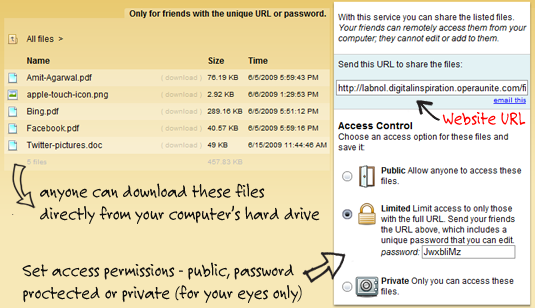
Pergi ke labs.opera.com atau unite.opera.com men-download perangkat lunak Unite Opera dan menginstalnya. Selamat, anda sekarang menjalankan web server pada mesin anda dan hanya membutuhkan beberapa menit untuk mengkonfigurasi folder file lokal yang Anda ingin berbagi dengan orang lain melalui internet.

Berikut adalah screenshot ilustrasi panel konfigurasi - tidak teknis di sini lagi.


Mulai browser Web Opera (ya, itu juga anda web server sekarang) dan mengaktifkan layanan Opera Unite dari sudut kiri bawah. Sekarang klik dua kali link File Sharing dan pilih folder yang isinya anda ingin berbagi di web. Setiap file atau folder di dalam folder ini kini dapat diakses melalui internet - Anda dapat menggunakan URL umum atau menentukan password pribadi untuk berbagi.

Video screencast berikut memiliki petunjuk rinci lebih lanjut tentang cara untuk memulai dengan Opera Unite atau Anda dapat mengacu pada Panduan Pengguna.


Opera Unite terlihat cukup bermanfaat tetapi ada layanan yang juga dapat melakukan hal yang cukup mirip. Sebagai contoh, baik PurpleNova dan Dekoh Dekstop memungkinkan pengguna berbagi konten di Internet secara langsung dari hard drive tanpa harus meng-upload di mana saja.

Update: Sangat penting untuk dicatat bahwa komputer Anda harus dalam keeadaan aktif dan juga terhubung ke Internet bagi orang lain untuk men-download file dan halaman web sejak Opera Unite stream konten langsung dari komputer Anda - tidak meng-upload atau  cache ke server sendiri . Mencobanya.


source

Unknown
Koneksi Lambat? Gunakan Opera

Opera 11.1 tersedia  di-download untuk Windows, Mac dan Linux.

Salah satu fitur terbaik dari Opera adalah built-in Turbo mode yang memungkinkan Anda menjelajah web lebih cepat bahkan pada koneksi yang lambat. Fitur ini juga dapat membantu Anda menghemat uang saat anda memiliki koneksi internet meteran, seperti kamar hotel, di mana Anda harus membayar per byte.

Mari kita bahas. Bila Anda meminta halaman web, katakan ponorogozone.com, browser anda akan terhubung langsung ke server ponorogozone.com untuk men-download semua gambar, teks, dan file terkait lainnya. Namun, dalam kasus Opera Turbo, permintaan yang sama diarahkan ke server Opera - pertama halaman web di-download pada server Opera, kemudian dikompresi dan disajikan kepada Anda.

Isi dan tata letak halaman tidak berubah setelah kompresi meskipun kualitas gambar sering berkurang. Tapi karena browser Anda sekarang memiliki jumlah byte yang lebih kecil untuk men-download untuk halaman web yang sama, akan memuat jauh lebih cepat pada komputer Anda.

Opera Turbo dengan Google WebP

Mode Turbo telah menjadi bagian dari Opera sejak versi 10 tetapi dengan rilis 11.1 yang baru, yang hari ini jatuh tempo, Opera server sekarang menggunakan Google WebP untuk format gambar, bukan JPEG, untuk kompres gambar. Akibatnya, ukuran byte dari gambar dikompresi berkurang lebih jauh tanpa penurunan banyak dalam kualitas visual.

Mari kita bandingkan ukuran foto-foto ini melalui Opera teratur, Opera Turbo (JPG) dan baru Opera Turbo berdasarkan kompresi WebP. Lihat hasil:


Kualitas gambar dikompresi cukup dapat diterima. Dalam beberapa kasus gambar dikompresi dengan WebP terlihat lebih baik (atau halus) dari orang-orang yang telah dikompresi dengan JPEG.

Dan ketika setiap byte, jelas penghematan besar dengan Opera 11.1. Fitur inovatif lain dari Opera adalah Opera Unite yang mengubah komputer Anda ke server dengan klik.


source

Unknown
Are you ready for Opera 11?
Opera Software debuted the newest version of its award-winning browser today. Opera 11 combines elegant design, smart updates to some of our most popular features and new ways to customize Opera to your preferences. Download it today for Windows, Mac and Linux computers fromhttp://www.opera.com/.
What’s new
Tab stacking
Tab stacking is a better way to organize your open tabs. Simply drag one tab on top of another to create a stack. Here is a short video to introduce tab stacking: http://www.youtube.com/watch?v=5hqSGGk1YTI
Extensions
Extensions help you personalize your browser and enhance what Opera can do. More than two million extensions have already been downloaded from https://addons.opera.com/. Try the top five most-downloaded extensions for yourself:
  1. NoAds authored by Lex1. The top ad-blocking extension for Opera.
  2. LastPass authored by lastpass. LastPass is a free password manager and form filler.
  3. FastestTube - YouTube Video Downloader authored by fastesttube. Download any video from YouTube.
  4. Image preview authored by whochan. Displays a pop-up preview of an image.
  5. Translate authored by neilj. Automagically translates foreign-language webpages.
Visual mouse gestures
With the flick of your wrist, mouse gestures let you navigate back and forwards, open new pages, close tabs and so much more. In Opera 11, you now have a handy visual guide to the wonders of mouse gestures.
Safer address field
We changed the address bar, so you can make better sense of the security levels of the sites you visit. Opera 11 now displays a clear badge indicating the security level and allowing immediate, one-click access to security and trust information about the site.
What we say
“We have always worked hard to introduce new and bold ideas in web browsing,” said Jon von Tetzchner, Co-founder, Opera. “But, sometimes we want to take an idea and improve upon it. Opera 11 adds a layer of polish to features people have known and loved for more than a decade, while introducing extensions. If you have never tried Opera before, Opera 11 will change everything you know about browsing.”
The rule of 30
  • Opera 11 is 30 percent smaller than Opera 10.60, so it downloads even faster
  • Plug-ins can be set to load on-demand. This can improve performance of the browser up to 30 percent.
More resources
About Opera Software ASA
Opera Software ASA has redefined web browsing for PCs, mobile phones and other networked devices. Opera’s cross-platform web-browser technology is renowned for its performance, standards compliance and small size, while giving users a faster, safer and more dynamic online experience. Opera Software is headquartered in Oslo, Norway, with offices around the world. The company is listed on the Oslo Stock Exchange under the ticker symbol OPERA. Learn more about Opera at http://www.opera.com/.
Find Opera on the Web

Unknown 1/19/2011